

How to Partially Close a Trade in MetaTrader: Step-by-Step Guide
⏱️ Estimated Reading Time: 4 minutes
📝 Summary: This tutorial explains the risk management technique of “scaling out,” showing exactly how to close a portion of an open position in MetaTrader 4 to secure profits while keeping the trade active.
Not everyone is aware that it is possible to close a portion of a trade while leaving the remainder open in the market. This technique, often called “scaling out,” is a powerful risk management tool used by professional traders. This guide will show you exactly how to execute a partial close in MetaTrader 4 (MT4) and why you should incorporate it into your strategy.
Table of Contents
Key Takeaways
- Flexibility: You don’t have to be “all in” or “all out.” Secure some profit and let the rest run.
- Manual Process: In MT4, you must manually select the volume to close in the order window.
- Psychology: Taking partial profits reduces stress and the fear of a winning trade turning into a loss.
- Risk Free: Combine partial closing with moving your Stop Loss to break-even for a risk-free trade.
1. How to Partially Close a Position
The process is straightforward but not immediately obvious in the MT4 interface. Follow these steps:
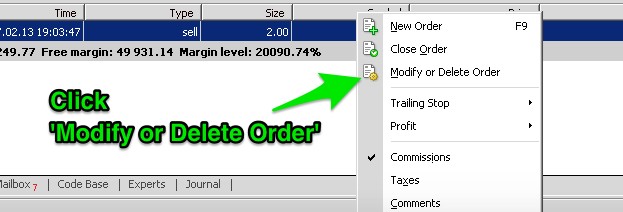
- Open the Terminal window (Ctrl+T) and find your open trade in the “Trade” tab.
- Double-click on the active order (or right-click and select “Modify or Delete Order”).
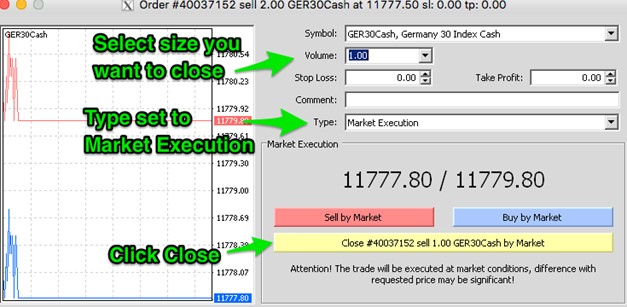
- In the Order window, change the Type to “Market Execution”.
- Crucial Step: In the Volume field, enter the amount you want to close (not the amount you want to keep).
Example: If you have a 1.0 Lot buy order and want to sell half, enter 0.50 in the Volume field. - Click the yellow button that says “Close #… [volume] at Market”.
2. Why Should You Use Partial Close?
Every experienced trader knows that “floating profit” is merely an illusion until it is booked. Markets can reverse in seconds due to news or flash crashes. If the market turns against you, a once-profitable position may end in a loss.
By partially closing a position, you gain control over your capital. You lock in guaranteed gains, which improves your psychology and reduces the pressure on the remaining portion of the trade.
3. When to Use It (Scenarios)
Scenario A: Approaching Resistance
If you bought EUR/USD and the price is approaching a major resistance level (R1, R2, or a daily high), it is prudent to close 50-70% of the trade. If the price breaks through, you still profit from the remaining portion. If it rejects, you have already banked money.
Scenario B: Strong Trend
In a strong trend, you might have multiple targets. You can close 30% of your position at Target 1, another 30% at Target 2, and let the final 40% run with a trailing stop to catch a “home run.”
4. Practical Example with Fibonacci
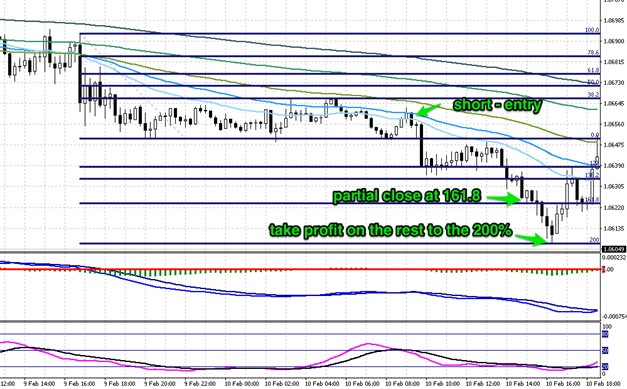
Let’s assume you opened a short position of 2.0 Lots on EUR/USD based on a Fibonacci setup.
- The price drops sharply and hits the 161.8% extension level. This is a common reversal point.
- Action: You close 1.0 Lot (50%) at this level to secure profit.
- Defense: You move the Stop Loss for the remaining 1.0 Lot to your entry price (Break-Even).
- Target 2: You aim for the 200% extension level with the remaining position.
Even if the price reverses completely from the 161.8% level, you walk away with a profit on the first half and zero loss on the second half.
Manage your trades like a pro.
Execute advanced trade management strategies and get paid for your volume.
Frequently Asked Questions
Does closing partially cost extra spread?
No. The spread is paid when you open the trade. Closing a portion just realizes the profit/loss for that portion. There are no additional fees for partial closes.
Can I partial close on MT4 mobile?
Yes. On the mobile app, tap and hold the order, select “Close”, and then manually edit the volume (lot size) at the top of the screen before tapping the close button.
Is partial close better than trailing stop?
They serve different purposes. Partial close secures a fixed amount of cash immediately. Trailing stop attempts to maximize the trend but might close the whole trade on a pullback. Many traders combine both.
⚠️ Disclaimer: The content of this article is strictly for informational purposes and does not constitute investment advice. FXRebate is a cashback and affiliate service, not a broker or fund manager; responsibility for trades and funds lies exclusively with the third-party broker. Trading with leverage involves high risks of capital loss. Partner links used do not generate additional costs for you.