

The Awesome Strategy: Trend Momentum & Strength
This strategy is designed to harness the full power of the Awesome Oscillator by combining it with two custom confirmation tools: Trend Strength and Trend Momentum. Aimed at the H4 timeframe, it filters out noise to provide clear, color-coded signals for major currency pairs.
Strategy Profile
Timeframe
H4 and Above
Pairs
Major Pairs
Indicators
AO + Custom Tools
1. Indicator Setup
You will need the standard Awesome Oscillator plus two custom indicators (Trend Strength & Trend Momentum) set up as follows:
- Awesome Oscillator (AO): Standard settings.
- Trend Strength: Must show a level at 16.
- Trend Momentum: Must show a level at 16.
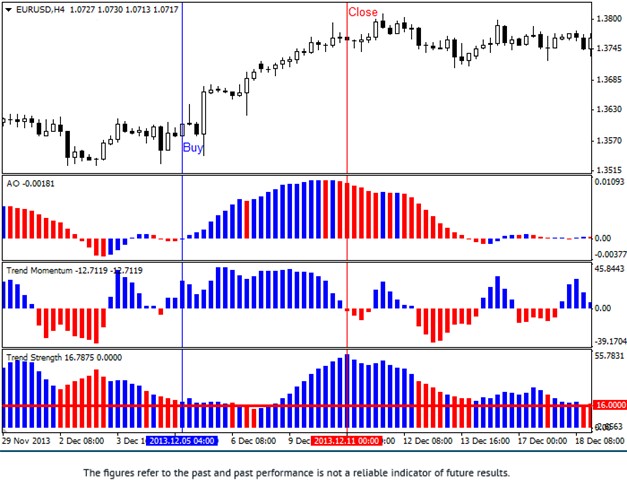
2. Long Entry (Buy) Rules
Enter a Buy trade when all indicators turn BLUE:
- AO: The histogram bars are Blue.
- Trend Strength: The bars are Blue.
- Trend Momentum: The bars are Blue AND positioned above the level 16.
3. Short Entry (Sell) Rules
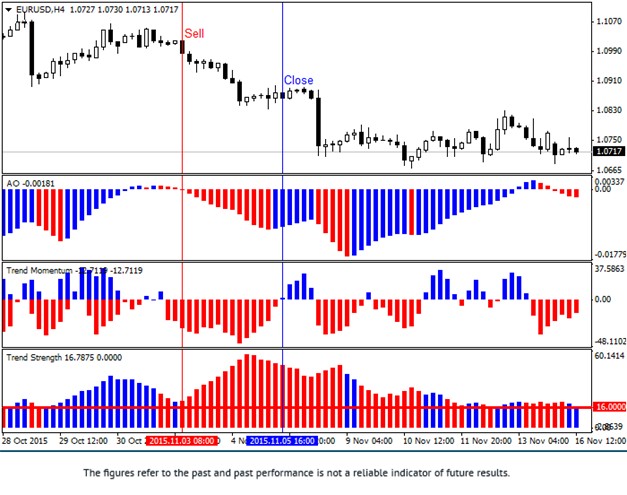
Enter a Sell trade when all indicators turn RED:
- AO: The histogram bars are Red.
- Trend Strength: The bars are Red.
- Trend Momentum: The bars are Red AND positioned above the level 16.
Exit Strategy
- Close Trade: Immediately when 2 out of the 3 indicators change color.
- Stop Loss: 50 points (pips) from entry.
Trade with Strength: Confirm your trends and earn cashback with FXRebate.