
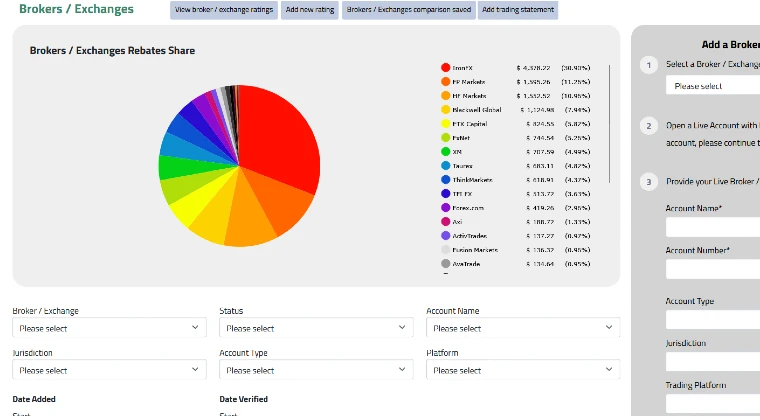
In today’s fast-paced trading environment, integrating your broker with a reliable trading platform can significantly enhance your trading experience. Whether you’re a seasoned trader or just starting out, linking your broker to our platform is a straightforward process that can be completed directly from your account. In this blog post, we’ll walk you through the step-by-step process of linking your broker and explain why this integration is a game-changer for traders in 2025.
Why Link Your Broker to Our Platform?
Connecting your broker to our platform allows you to unlock powerful tools, track your trades in real time, and manage your portfolio seamlessly. With features designed to streamline your trading journey, this integration ensures you stay ahead in the market.
Here are a few benefits of linking your broker to our platform:
- Advanced Trading Tools: Gain access to cutting-edge tools that help you analyze and execute trades efficiently.
- Real-Time Insights: Monitor your portfolio and trades in real time for better decision-making.
- Simplified Portfolio Management: Manage all your investments from one centralized platform.
Step-by-Step Process to Link Your Broker
Follow these simple steps to link your broker account to our platform:
1. Access the Brokers and Exchanges Section
Log in to your account and navigate to the Brokers and Exchanges section. This is where you’ll find the option to link your broker account to our platform.
2. Initiate the Linking Process
Click on the Add a Broker/Exchange Account button. This will open a form where you can input the required details to connect your account.
3. For Capital.com Users
New Users:
If you don’t already have a Capital.com account, you can conveniently open one directly from our platform. Once your account is created, it will automatically link to our platform, saving you time and effort.
Existing Users:
If you already have a Capital.com account, simply proceed to fill out the form with the following details:
- Account Name: Enter the name associated with your account.
- Account Number: Provide your unique account number.
- Account Type: Select the type of account you hold (e.g., individual, corporate).
- Jurisdiction: Specify the jurisdiction under which your account operates.
- Trading Platform: Indicate the trading platform you’re using.
- Additional Notes: Add any relevant notes or details you’d like to include.
4. Submit Your Information
Once you’ve completed the form, review your details carefully to ensure accuracy. Then, click the Submit button to finalize the process.
What Happens Next?
After submitting your account details, our system will process the information and establish the connection. Once linked, you’ll gain access to a suite of tools and features tailored to enhance your trading experience.
Tips for a Smooth Integration
To ensure a seamless linking process, follow these tips:
- Double-Check Your Details: Make sure all the information you provide matches your broker account to avoid delays.
- Stay Updated: Keep an eye on your email for any updates or confirmation messages regarding the linking process.
- Reach Out for Support: If you encounter any issues, our support team is here to assist you every step of the way.
Conclusion
Linking your broker to our platform is a simple yet powerful step toward optimizing your trading strategy. Whether you’re opening a new account or connecting an existing one, the process is designed to be user-friendly and efficient. Don’t wait—enhance your trading experience today by linking your broker to our platform!
Ready to Get Started?
Log in to your account now and take the first step toward seamless trading integration. With our advanced tools and real-time tracking capabilities, you’ll be well-equipped to navigate the dynamic world of trading in 2025.
Frequently Asked Questions (FAQs)
Q1: What brokers can I link to your platform?
Our platform supports integration with most major brokers, including Capital.com. Check the Brokers and Exchanges section in your account for a complete list.
Q2: Is there a fee for linking my broker?
No, linking your broker to our platform is completely free.
Q3: How long does it take to link my broker?
The linking process is typically completed within minutes after submitting your information.
Q4: What should I do if I encounter issues during the linking process?
If you experience any difficulties, reach out to our dedicated support team via email or live chat for assistance.
Share This Blog!
If you found this guide helpful, don’t forget to share it with fellow traders who might benefit from seamless trading integration. Together, we can build a community of smarter and more efficient traders.
Stay tuned for more tips and updates on optimizing your trading experience in 2025!