The Awesome Strategy: Trend Momentum & Strength
This strategy is designed to harness the full power of the Awesome Oscillator by combining it with two custom confirmation tools: Trend Strength and Trend Momentum. Aimed at the H4 timeframe, it filters out noise to provide clear, color-coded signals for major currency pairs.
Strategy Profile
Timeframe
H4 and Above
Pairs
Major Pairs
Indicators
AO + Custom Tools
1. Indicator Setup
You will need the standard Awesome Oscillator plus two custom indicators (Trend Strength & Trend Momentum) set up as follows:
- Awesome Oscillator (AO): Standard settings.
- Trend Strength: Must show a level at 16.
- Trend Momentum: Must show a level at 16.
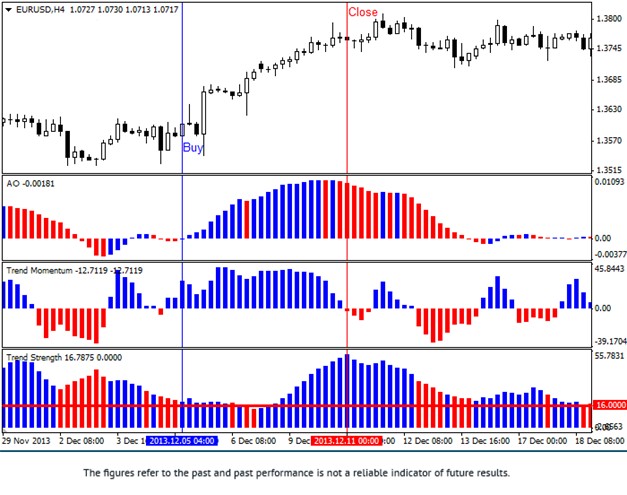
2. Long Entry (Buy) Rules
Enter a Buy trade when all indicators turn BLUE:
- AO: The histogram bars are Blue.
- Trend Strength: The bars are Blue.
- Trend Momentum: The bars are Blue AND positioned above the level 16.
3. Short Entry (Sell) Rules
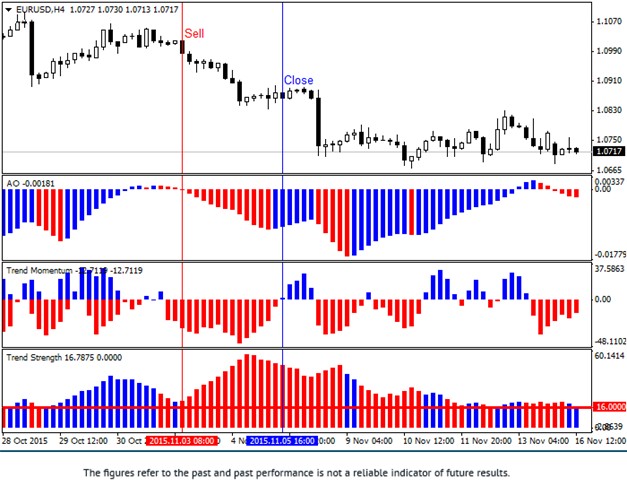
Enter a Sell trade when all indicators turn RED:
- AO: The histogram bars are Red.
- Trend Strength: The bars are Red.
- Trend Momentum: The bars are Red AND positioned above the level 16.
Exit Strategy
- Close Trade: Immediately when 2 out of the 3 indicators change color.
- Stop Loss: 50 points (pips) from entry.
Trade with Strength: Confirm your trends and earn cashback with FXRebate.
⚠️ Disclaimer: The content of this article is strictly for informational purposes and does not constitute investment advice. FXRebate is a rebate and affiliate service, not a broker or fund manager; responsibility for trades and funds lies exclusively with the third-party broker. Trading Derivatives carries a high level of risk to your capital and you should only trade with money you can afford to lose. Trading Derivatives may not be suitable for all investors, so please ensure that you fully understand the risks involved, and seek independent advice if necessary. Partner links used do not generate additional costs for you.